







Breadcrumb
Concur Travel
SAP Concur connects the entire travel program – from the travel authorization, to booking, to the expense report and reimbursement – so travelers get a complete paperless workflow. Concur helps guide travelers to make in-policy travel decisions while delivering a simpler, better traveler experience.
Please note that you must first request the Concur State Travel Card and take the associated training before a live Concur link will be given.
All resources for Concur will be available on our CSU Systemwide Concur Page. To access this page, you will need to log in to CSU Connect (also available under myHumboldt Faculty/Staff Resources). We will also have some campus-specific guides available here as well as needed
Concur Drop In Office Hours
NOTE: This is a Concur Q&A session and different from Concur Training for New Cardholders (training link will be emailed to you after card application submission).
Click this Link to access DROP IN TRAINING on any of the times/days below:
3:00 p.m. - 4:00 p.m., Tuesdays
11:00 a.m. - 12:00 p.m., Wednesdays
10:00 a.m. - 11:00 a.m., Thursdays
Concur Travel and Expense
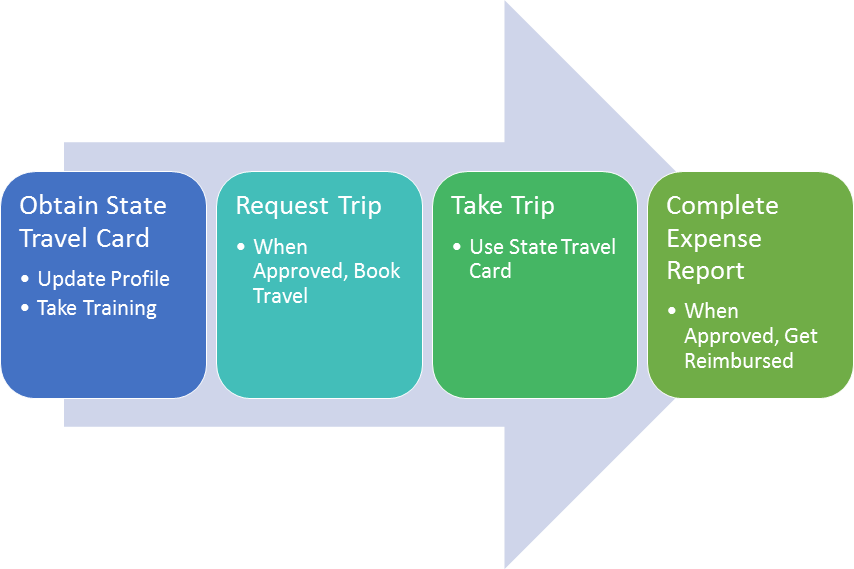
Step 1: Obtain State Travel Card
Business Services will assist you in obtaining a State Travel Card. Any hotel or rental car reservations will automatically be charged to your card and feed into your expense report. The travel card should never be used unless you have an approved trip in Concur.
Step 2: Request Trip
With Concur Request, you can budget for employee expenses before they’re incurred using a customizable pre-spend control, request and approval process. Concur Request integrates with the travel and expense solutions creating an easy workflow. Automating the travel and expense processes is the simplest way to reduce paper, add a few hours back to everybody's day and cut costs. Once you request your trip, the workflow will automatically route to your chart field approver and administrator for approval. Once approved, travelers can easily book flights, hotels and cars from a desktop or mobile device while staying compliant with CSU Travel Policy. SAP Concur delivers travel tools designed to give you visibility, efficiency and savings, while allowing travelers to book where and how they want.
Step 3: Take your Trip
Don’t forget your State Travel Card! Remember, if the state is paying for 100% of your travel, you must use the Concur State Travel Card. During your trip, streamline your business travel planning and itinerary management with partnered apps such as Trip It, and Uber. Enterprise Rent-A-Car and most major hotel chains are already partnered with Concur so any required receipt will be automatically fed to your expense report if you sign up for e-receipts in your profile. If not, you can use the Concur app to snap a photo of your receipt and assign it to a line item in your expense report.
Step 4: Expense Report
Move away from paper receipts and spreadsheets. This isn’t just about expenses, it’s about making sure everything is taken care of. From capturing data accurately and staying compliant with regulations and policies, to seeing all of your spending in one place with the tools to manage expenses wherever business takes you. When using the State Travel Card, data flows automatically into Concur Expense, so employees save time and can quickly submit an accurate, in-policy expense report. Once the expense report is submitted and goes through the chart field and administrator approval workflow, the traveler will be reimbursed for any out of pocket expenditures.
Have questions or need help creating or submitting a report? Please reach out to travel@humboldt.edu.
Travel Management Company
Our campus utilizes Christopherson Business Travel as our Travel Management Company. Information about who Christopherson Business Travel (CBT) is and the advantages of using CBT Christopherson Intro Flyer.
If you are not able to complete your booking online through Concur, and/or you have questions regarding your individual or group travel needs, you can call the full-service travel advisor team, whose contact information is available on your home page in Concur.
Concur Videos
Concur User Guides
All resources for concur will be available on our CSU Systemwide Concur Page. To access this page, you will need to log in to CSU Connect. We will also have some campus specific guides available here as well.
Request
How to Create a Hospitality Justification Request
This is a comprehensive guide for Hospitality in Concur, from Request to Expense Reports
How to Create a Travel Request
This is a comprehensive guide of Concur, from Request to Expense Reports
Create a Credit Card Services Request
Expense
Create an Expense Report from an Approved Hospitality Request
Create an Expense Report from an Approved Travel Request
Report Details
Add Expenses
Itemize Expenses
Allocate Expenses
Additional Concur Resources
Update your Travel Profile
Book a Flight
Make a Hotel Reservation
Reserve a rental Car