






Breadcrumb
Purchasing
Forms & Approvals
All SPF forms can be found in the SPF Forms Library. SPF forms should be submitted to Accounts Payable (AP) via DocuSign whenever possible. Contact your Grant Analyst for training and assistance with DocuSign.
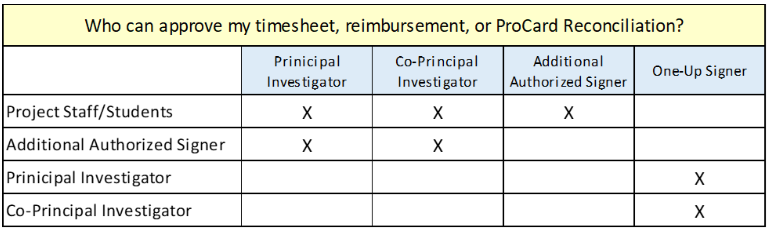
SPF Accounts Payable transactions must be approved by an authorized signer for the fund. Contact your Post Award Grant Analyst to confirm who has signature authority on the SPF fund being used. Be mindful when selecting which DocuSign PowerForm to use from the SPF Forms Library. If you are not an authorized signer, use the form that says “Submitting on behalf of your PI or someone else”. If you are an authorized signer, and you are reimbursing yourself, use the form that says “With One-Up Approval”. Refer to the table below to determine if one-up approval is needed.
When an exception is applicable to your purchase (including recurring exceptions for ITS, Facilities, and Marcom related purchases), please attach the approval next to the related receipt.
All expenditures must be reasonable, allowable, and allocable to the sponsored project or fund benefiting from the expense, in accordance with Uniform Guidance (2 CFR 200) and CSU policies.
Reviewers must confirm that the cost directly benefits the project/fund charged. Costs should be proportional to the benefit received. If benefit is shared, allocation should be documented with a clear and reasonable method.
Approvers verify allocability by ensuring the expense supports the specific aims, objectives, or scope of the project/fund.
Allocability Principle:
A cost is allocable to a particular sponsored agreement or fund if the goods or services involved are chargeable or assignable to that agreement in accordance with the relative benefits received.
Procedure:
- Confirm that the expenditure directly advances the purpose of the fund/project.
- If the cost benefits multiple projects, allocate the cost based on a reasonable, documented method.
- Do not assign costs to a project if they are intended to cover deficiencies in another fund, or if they do not align with the project’s objectives.
Allowable Costs:
Costs that are permissible under federal regulations (2 CFR §200.403, 2 CFR §200.404, 2 CFR §200.405), sponsor terms, and institutional policies. They must be:
Reasonable: Reflecting the action a prudent person would take
Allocable: Directly benefiting the specific sponsored project
Consistently Treated: Applied consistently under like circumstances
CSU Sponsored Programs Policy: See section on Allowable Costs
All SPF chartfields should be budget checked against OBI (both account and fund balance), with the following exceptions:
- When a fund includes the “Fixed Fee Contract Budget” Account 660929, only the total remaining fund balance should be checked, not the individual account balance.
- SPF trusts (start with letter T) do not have account trees and therefore only the total remaining fund balance should be checked, not the individual account balance.
When an account or fund has a balance that is lower than the total of the expense being processed, an SPF Grant Analyst must determine if the item is “okay to pay” or determine an alternative chartfield.
When Accounts Payable documents are being reviewed for accuracy, if it is determined that an entry error/typo has occurred (e.g. Travel Expense Claim lists $146.90 and the receipt says $149.90)
Reimbursements are defined as a repayment made to a Payee who has already incurred and paid for an approved expense using personal funds. This process applies to all reimbursements where no additional services or payments are associated with the transaction.
Sometimes SPF projects require a Principal Investigator (PI), student, or other staff to make one-time purchases with their personal funds. In rare instances, it may be appropriate for a third-party organization to make one-time purchases with their business funds. (This should not be done as a means to circumvent SPF or University policies and procedures.) In either case the payment request is processed using CSUBUY Legacy.
Submitting a Request for Payment
If you are an approved signer on the grant/contract or trust use this version of the DocuSign Power Form: Payment Request Form
- Are you submitting the Payment Request Form on behalf of your PI or someone else? If yes, use this version instead!
If you are an approved signer on the grant or trust and you are claiming a reimbursement for yourself, use this version: Payment Request Form (With "One-Up" Approval)
- Are you submitting the Payment Request Form (With "One-Up" Approval) on behalf of your PI or someone else? If yes, use this version instead!
*Reimbursements for travel, please refer to the Travel section of this website link below
*Reimbursements involving hospitality (expenses related to anything that is being "given away" e.g. meals, textbooks, branded merchandise, etc.), please refer to the Hospitality drop-down under Special Purchasing Types below
Getting Paid
Cal Poly Humboldt students, staff, and faculty do not need to submit any additional documentation with their Payment Request Form prior to receiving a reimbursement. However, all students, staff, and faculty are responsible for ensuring that their address on file with the University matched the address being used on their Payment Request Form. Differences between these two addresses requires manual confirmation and will delay payment. Students, staff, and faculty who wish to receive their reimbursement payment via direct deposit should complete the Direct Deposit Form for Accounts Payable Reimbursements DocuSign Power Form (being enrolled in direct deposit for your payroll will not carry over to Accounts Payable.)
Third-party organizations must submit a Payee Data Record a.k.a. "204 Form" AdobeSign Campus Form before or with the Payment Request Form in order to receive a reimbursement payment, regardless of whether they are already a registered supplier in P2P.
A direct payment is defined as a disbursement made directly by the University/SPF to another organization or individual not associated with Cal Poly Humboldt, in exchange for services, non Cal Poly Humboldt tuition, or other allowable costs.
Direct payments may be initiated when the Supplier has provided an invoice, estimate, quote, lease, or other payment agreement. Invoices payments can be disbursed immediately. For estimates, quotes, leases, or other payment agreements a Purchase Order ("promise to pay") will be created and the payment will be disbursed when the final invoice(s) are received.
Non-student stipends are considered a direct payment. The Non-Student Stipends, Honorariums, Special Lecturer Payment Form takes the place of an invoice. See the Special Lecturer/Honorarium & Non-Student Stipend drop-down below for more information.
All direct payments are processed using CSUBuy Procure-to-Pay "P2P".
Note: Purchase Orders for Subaward agreements may only be initiated by internal SPF staff.
Submitting an Invoice
If you are an approved signer on the grant/contract or trust and you're submitting an invoice for payment, use this version of the DocuSign Power Form: Payment Request Form
- Are you submitting the invoice on behalf of your PI or someone else? If yes, use this version instead!
*Reimbursements involving hospitality (expenses related to anything that is being "given away" e.g. meals, textbooks, branded merchandise, etc.), please refer to the Hospitality drop-down under Special Purchasing Types below.
Submitting a Purchase Order Request
If you have an estimate, quote, lease, or other payment agreement and;
You are an approved signer on the grant/contract or trust, use this version of the DocuSign Power Form: Purchase Order Request Form to establish a Purchase Order in P2P.
- Are you submitting the Purchase Order Request Form on behalf of your PI or someone else? If yes, use this version instead!
Getting Paid
Payees must register as a Supplier in P2P!
Suppliers must be invited to register in P2P and they must complete a Supplier Registration before receiving payment from Cal Poly Humboldt. To request a new supplier, e-mail hsuf@humboldt.edu with the organization or individual's legal business name or the name that will appear on their invoices, the email address for any individual who can provide accurate financial and legal information about the organization, and a brief description of the nature of their business with SPF.
FYI: Required information to complete the Supplier Registration includes but is not limited to:
- Tax ID#
- Company structure and organization
- Banking info
- Preferred payment remittance
- IRS tax status
Within 2 business days, the individual will receive an email from support@jaggaer.com with the subject line: “ Supplier Portal Invitation from The California State University”. The invitation email contains a link to the portal (Register Now button).
Suppliers should visit the Supplier Resources page for help with the registration process, or contact csubuy-suppliersupport@calstate.edu for direct assistance.
The CSU contracts with certain suppliers to offer a catalog of goods and services which can be purchased directly through the CSUBUY P2P eMarketplace. Each suppliers catalog is referred to as a "punchout."
SPF does not require the use of these punchouts when purchasing from contracted suppliers, but University and SPF staff are welcome to browse and ship from the punchouts as they desire.
⚠️ Important: For SPF, when submitting a punchout order in P2P, your final step must be to 'Assign Cart' to the SPF Purchasing Coordinator!!! Before your order is placed, an Approved Project Signer must also complete the DocuSign Power Form: P2P Assigned Cart Approval Form* which will be sent to them by the Purchasing Coordinator after the Requisition has been created.
*When hospitality items are identified as a part of the order, a Hospitality Form will be sent in place of the P2P Assigned Cart Approval Form.
Reasons to Shop Using P2P Punchouts
Often these catalogs offer discounted prices and/or additional warranties and shipping protection not offered elsewhere.
If you struggle with monthly ProCard reconciliations, using the punchout will save you time!
Reasons to Avoid Punchout Shopping
Currently, P2P does not allow for off-campus shipping. If you need your items delivered to a non-Cal Poly Humboldt owned location, you will need to use a ProCard for your purchase instead. If you choose to use the punchout anyways, it is your responsibility to arrange for transportation of the items from campus to their final destination.
As a reminder, the average turnaround time on AP processing is still 5-7 weeks. The best way to ensure that your SPF reimbursements, travel claims, advances, etc. are paid timely is to submit complete and accurate documentation. We understand that this is not always easy to do! SPF offers Drop-In Zoom Hours every weekday from 2:00-3:00pm. Please take advantage of these open drop-in sessions if you don’t feel confident with the information that you’re submitting (including ProCard reconciliations). The more corrections we can make with you on the front end, the quicker your reimbursements will be processed.
If you have any questions on how to complete any type of reimbursement form, please contact our front office at (707) 826-4189 or hsuf@humboldt.edu for guidance.
Special Purchasing Types
The Procurement Matrix provides a quick reference for determining the appropriate procurement method based on the type and dollar value of a purchase. It is designed to help ensure compliance with Cal Poly Humboldt Sponsored Programs Foundation (SPF) procurement requirements, federal Uniform Guidance (2 CFR Part 200), and applicable sponsor regulations. Before initiating a purchase, review the matrix to identify the required procurement process, documentation, and approvals.
The University and SPF provide financial assistance to students from various funding sources. The financial assistance provided may be referred to as an award, stipend, scholarship, internship, tuition assistance, fellowship, or grant. Regardless of the funding source or term used, these payments are financial assistance to the student. In order to comply with governmental reporting requirements, all payments made to students (unless they have been hired as SPF employees) must be processed through the Student Financial Services and posted to the student's account.
Forms & Links
To provide a student with a stipend for participation-based activities, a Principal Investigator or Authorized Project Signer should complete the Student Award Request Form DocuSign Power Form.
If you are submitting the Student Award Request Form on behalf of your PI or someone else use this version instead!
A stipend payment is money provided directly to the student which they may use at their discretion to cover cost of living expenses, books, technology, or other educational supplies. See more details below about how to complete the form.
To pay for a student’s tuition or other campus fees (i.e. on-campus housing, dining, and parking permits) a Principal Investigator or Authorized Project Signer should complete the Third Party Financial Guarantee DocuSign Power Form
If you are submitting the Third Party Financial Guarantee on behalf of your PI or someone else use this version instead! See more details below about how to complete the form.
Please allow at least two weeks from the date of receipt of the form for processing by Student Financial Services. Any outstanding tuition or campus fees from the current or previous semester may be paid from the award amount first. The remainder of the award will be distributed to the student. Exceptions can be made; please contact Student Financial Services.
In rare cases where a student is already receiving aid at the full cost of attendance, their financial aid package may be adjusted. It is important to submit Student Award Request Forms and Third Party Financial Guarantees prior to the beginning of the semester for this reason!
Note: If your SPF award includes stipend and/or tuition for the academic year, please include both semesters on the form(s) to assist SFS with compliance with new state requirements…* Students are encouraged to contact Student Financial Services directly to understand how the award may affect their complete aid package by calling 707/826-4407 or visiting SBS 257.
Once the payment is available, the student is notified by an email that a check is available for pick-up at the Cashiers' Office or has been processed via direct deposit. If the Student has enrolled in direct deposit, the student receives an email notifying them that the funds are being transferred into their bank account. If the Student would like to enroll in direct deposit, this can be done by accessing their student center.
Tips for Saving Time:
- Consider having your students use the “Submitting on behalf of your PI or someone else” version of the forms to initiate their own award request. This way, the Student can fill out their own basic information like their Humboldt ID#. The PI or Approved Project Signer will still be able to edit the details of the form when it’s their turn to sign!
- Complete the DocuSign Power Form with your student (on zoom or in person) at the time of your agreement to provide the award. DocuSign Power Forms can be filled out on your phone, with or without downloading the DocuSign app!
- If you’re hosting an orientation for multiple students, consider having them complete their own award request form as a group, to kick off the session. You may invite someone from SPF to join/guide the process.
- Have your students schedule a group meeting with someone from SPF via zoom by calling 707/826-4189. The Front Office staff will connect them with a staff member who has matching availability.
Tips & Tricks for the Student Award Request Form:
***For a step-by-step guide with screenshots, contact your SPF Grant Analyst or call the SPF Front Office at 707/826-4189!
- If you're unsure who your SPF Grant Analyst is, please call the SPF Front Office at 707/826-4189 to confirm.
- Read through all form details on page 1 for the form before starting!
- The "Contact" should be whoever Student Financial Services should contact if they have any questions about the stipend. Do not list the Student here.
- Enter a detailed "Description of Award". What is the stipend to be used for? How did the student earn the stipend? Remember that this form is for stipend payments only. If the description of the award mentions tuition or other registration fees, you're likely using the incorrect form.
- Example Description of Award: Cost of living stipend for participation in Kelp Forest conservation corp.
- The "Total Anticipated Award Amount for this Student" should be the total amount that the Student is expected to receive from this award over the course of the semester(s) selected. Often the student is receiving one lump sum, but some grants may require incremental payments. You have the option to indicate the anticipated number of payments.
- It is always better to submit the Student Award Request Form as early as possible. If you believe the Student will also receive this award in future semesters, use this form to let Student Financial Services know sooner than later. You can always contact SFS to withdraw all or some of the award in the event that the student does not complete their participation.
- Indicate what semester(s) the stipend payment should be awarded for. In which semester(s) should the stipend be applied to the student's account?
- Enter the "SPF Project Name" exactly as it appears in OBI. If you're unsure, contact your SPF Grant Analyst to confirm.
- Student Financial Services will deduct the total amount from the SPF grant/trust as soon as the form is processed, regardless of the distribution dates to the student. Any undistributed amount can be returned to the SPF fund/trust if necessary.
- If you indicated that there should be more than one payment to the student, please list the incremental amounts and dates that each increment should be disbursed. Student Financial Services will do their best to comply with the requested Payment Date when possible, but may not be able to meet the exact date requested based on the timing of them receiving the form.
- When submitting on behalf of the PI or Approved Project Signer, the DocuSign Power Form will route to the PI or Approved Project Signer for their signature once you "Finish" the form. They will receive an email with the subject: "Complete with DocuSign: Student Award Request Form Student Name".
- The DocuSign Power Form will automatically route to the Student. They will receive an email with the subject: "Complete with DocuSign: Student Award Request Form Student Name".
- Please allow at least two weeks from the date of receipt of the form by Student Financial Services for processing. If there are any changes or concerns about the payment after the Student Award Request Form has been submitted (e.g. the Student drops out of classes or other extenuating circumstance), please contact Student Financial Services immediately by calling 707/826-4407 or visiting SBS 257.
Tips & Tricks for the Third Party Financial Guarantee:
***For a step-by-step guide with screenshots, contact your SPF Grant Analyst or call the SPF Front Office at 707/826-4189!
- If you’re unsure who your SPF Grant Analyst is, please call the SPF Front Office at 707/826-4189 to confirm.
- You’ll need to know the Student’s contact information before you start the form: First Name, Last Name, ID #, Phone #, and E-mail are all required fields.
- If you want to set an "Up to $ Amount", enter that amount where applicable. Student Financial Services will only pay the portion of the selected "Fees to Pay" that does not exceed this amount. If you leave this section blank, SFS will assume that you're willing to cover the full cost of the selected fees for this student.
- If you've selected more than one semester for this award, the "Up to $ Amount" should be for the total award. If you wish to split the total amount in a specific way, you can clarify below in the "Additional explanation for Student Financial Services (optional)" section for the form.
- Regardless of whether or not you enter an "Up to $ Amount", the student will not receive any funds in excess of their total for the fees you've selected.
- Use the chartfield information that should be used when billing the SPF grant or trust. The "Total $" will be an estimate. Student Financial Services will only bill for the actual total of the fees you've selected or for the "Up to $ Amount" that you've entered.
- When submitting on behalf of the PI or Approved Project Signer the DocuSign Power Form will route to the PI or Approved Project Signer for their signature once you "Finish" the form. They will receive an email with the subject: "Complete with DocuSign: Third Party Financial Guarantee Student Name"
- The DocuSign Power Form will automatically route to Cal Poly Humboldt Student Financial Services to be processed and the Student will also receive a copy via email with the subject: "Complete with DocuSign: Third Party Financial Guarantee Student Name". When the Student opens their email, they can select "VIEW COMPLETED DOCUMENT", then select the third icon that looks like an arrow pointing down toward a line, then select “Combined PDF” to download a copy of the form for their records.
- Please allow at least two weeks from the date of receipt of the form by Student Financial Services for processing. The payment will be posted to the Student's account as soon as possible and an invoice for the amount will be sent during the third week of the semester to the SPF Grant Analyst. The SPF Grant Analyst will prepare a DocuSign Payment Request Form using the chartfield provided on the Third Party Financial Guarantee to pay the invoice. The PI or Approved Project Signer must sign the Payment Request Form. Only once the invoice has been paid, will the funds leave the SPF grant or trust.
- If there are any changes or concerns about the payment after the Third Party Financial Guarantee has been submitted (e.g. the Student drops out of classes or other extenuating circumstance), please contact Student Financial Services immediately by calling 707/826-4407 or visiting SBS 257.
The Non-Student Stipends, Honorariums, Special Lecturer Payment Form DocuSign Power Form is used to provide compensation to non-Humboldt employees, students, staff and faculty. Examples of when this form should be used are: visiting faculty/non-faculty providing a one-time lecture/service, providing stipends to grant/contract participants (non-Humboldt-related), providing an honorarium to an individual that is project/grant related.
Note: Individuals being paid from this form will need to register as a supplier in P2P! See direct payments section above for more details about CSUBuy P2P.
This form should not be used to pay anyone who is doing work that can be considered hourly employment. Payment to the non-Humboldt related vendor will not be made until the work is completed. The date(s) of service specified on the form will determine when the payment is made.
Most IT hardware, software, and accessories require prior approval before purchasing.
SPF has collaborated closely with campus ITS to detail appropriate technology purchasing procedures on their website: Click Here to view resources for Technology Purchasing for Staff & Faculty.
Furniture/equipment that will be used at-off campus program/project sites does not require pre-approval. These items should not be delivered to campus. They should be delivered directly to the project site. Please indicate that the furniture/equipment will be delivered to and exclusively used off-campus somewhere on your reimbursement request or ProCard reconciliation packet.
Furniture/equipment that will be delivered to or used on campus requires pre-approval by Facilities Management. Submit requests via the service request link, and attach the approval to the reimbursement request or ProCard reconciliation packet when submitted.
A U-Haul or similar transport truck will sometimes be required to transport research supplies, equipment, or furniture to remote field locations. In such instances, the rental fee and other associated costs may not always be considered a ‘travel expense.’ If the expense is approved in the budget as 660003 Supplies and Services, the reimbursement can be processed without including a travel expense claim.
Cal Poly Humboldt issued new Print Production Guidelines, effective July 1, 2018. These guidelines extend to university auxiliaries, including Sponsored Programs Foundation (SPF).
Individuals using grant, trust, or SPF general operations funds will consider Marketing & Communications (Marcom) first, for all of their print production needs. It is acknowledged however, that SPF print production related expenses will not require individual approval when off-campus printing services are used, due to the following circumstances:
- Last minute and/or emergency printing needs for projects cannot always be accommodated by Marcom with the necessary timeliness.
- SPF grant employees and participants are often stationed remotely, and do not have easy access to Cal Poly Humboldt’s campus.
SPF follows closely to Cal Poly Humboldt Hospitality Policy and procedures with few exceptions:
Exceptions
Coffee and alcohol can be an allowable SPF purchase. A Hospitality Form is required.
SPF allows for exceptions to the per person hospitality limits with documented SPF Executive Director's approval.
Promotional items (not bearing the Cal Poly Humboldt trademark) do not need Marcom pre-approval. A Hospitality Form is required. For officially trademarked items see here for current guidelines.
SPF has its own ProCard Hospitality Form with slight variations from the stateside version, available as a DocuSign PowerForm. The SPF version of the form allows for one form to be completed per event.
Submitting a Hospitality Request for Payment
If you are an approved signer on the grant/contract or trust use this version of the DocuSign PowerForm: Hospitality Form
- Are you submitting the Payment Request Form on behalf of your PI or someone else? If yes, use this version instead!
If you are an approved signer on the grant or trust and you are claiming a reimbursement for yourself, use this version: Hospitality Form (With "One-Up Approval)
Note: If the typical approved signer for the grant or trust was in attendance at the hospitality event or otherwise personally benefitted from the hospitality, the next highest "one-up" should sign instead. If you're having trouble identifying the next highest "one-up" please contact the SPF Front Office for assistance: hsuf@humboldt.edu or 707-826-4189
Services
Off-campus services do not require prior-approval, except in cases where a signed agreement is required.
Principal Investigators are not authorized to enter into contracts on behalf of the auxiliary. Any contract or agreement (or any form with terms) must be reviewed and signed by the SPF Executive Director.
SPF will review the terms of all service agreements before signing, and determine if insurance is required. If determined, insurance shall be obtained by SPF. This applies to both on and off-campus services where there is an exchange of value.
A copy of the signed contract or agreement must be attached as reference to every payment.
Procurement staff will only review SPF service agreements against the CSU general provisions when SPF Trust funds are being utilized in support of stateside facilities & equipment.
Catering Services
Catering services for SPF grants and contracts do not require prior approval, but catering for on-campus events must be provided by a vendor on the approved list. A signed hospitality form must be provided for catered events and meals.
Facility Rentals
Facility rentals for SPF grants and contracts do not require pre-approval. However, rental agreements (or any form with terms & conditions) must be reviewed and signed by the SPF Executive Director. Any required insurance, per the terms, shall be obtained by SPF. A copy of the signed agreement must be attached as reference to every payment.
Charter Bus Rentals
An SPF grant or trust can be used to reimburse a third party for chartering a bus. It is encouraged to use a ProCard to pay for the chartering when possible. The expense for the rental does not need to be combined/included on the Travel Expense Claim for the trip, but can still be charged to a travel account. Proof of insurance is not required to be provided along with the reimbursement, though it is strongly recommended that program/project staff receive proof from the third party.
SPF allows for direct reimbursement of costs associated with Live Scan fingerprinting and other associated background check services.
Local residents are strongly encouraged to complete their Live Scan through Cal Poly Humboldt UPD and to bring a pre-filled Request for Live Scan Service Form to their appointment. The form includes a chartfield for the service location to bill which prevents the individual from having to pay out of pocket.
Few SPF grants allow for non-Cal Poly Humboldt students to receive tuition support via a scholarship.
When a non-CPH student pays tuition to their university, we cannot reimburse the student directly for tax reasons (the student should not have to pay taxes on the amount since it's a scholarship) so the University must receive a direct payment which must be paid using P2P.
The University then refunds the student; if necessary via their aid package. (This allows the payment to be added to the student’s 1098-T and not a 1099 form and will not be reportable income that can alter the student’s aid)
***This does not apply to CPH students.
Gift Cards for Students
For detailed limitations regarding gift cards for students, see Payments to Students (Section 5).
Gift cards should not exceed $25 per academic year without reporting. Gifts cards totaling $26 or more require Financial Aid Office pre-approval!
- Purchasers must submit a Gift Card Pre-Authorization List (DocuSign PowerForm) when the distributor knows the list of students who will be receiving the gift cards beforehand. If the distributor does not know what students will be receiving the gift cards beforehand (i.e. a survey), the pre-authorization form is not required, and the distribution list is only required.
- After distribution, a signed Gift Card Distribution List (DocuSign PowerForm) must be included with the Payment Request Form or ProCard Reconciliation packet. AP will share these with SFS.
Gift Cards for Everyone Else
Limitations surrounding gift card purchases can be found here: De Minimis & Gift Card Guidelines
Note: For Sponsored Programs Foundation only: Certain approved funding sources, such as discretionary HMSPF trust funds, may be utilized to purchase gift cards for Cal Poly Humboldt staff or faculty. For further details, please contact hsuf@humboldt.edu
The Lost Receipt Form should be completed/submitted whenever you are unable to provide your original receipts for your reimbursement packet. A good faith effort should be made to collect a copy of the receipt before using this form. The claimant lists, in detail, the circumstances surrounding the lost receipts and verifies the expense. The Lost receipt Form should be itemized (as the original receipt would have been). This includes listing taxes and fees separately from the cost of the items. Both an authorized project signer should sign this form, as well as the claimant.
Contact the SPF Front Office at (707) 826-4189 or hsuf@humboldt.edu if you need to initiate a DocuSign envelope to sign this form.